Welcome to My Blog

Sunday, 27 May 2012

How To Get Facebook On Your Desktop


How To Get Facebook On Your Desktop
Seesmic DesktopFacebookerXobniFacebook Sidebar GadgetScrapboy and Facebook AIR application are desktop applications that allows you interact with your stream just as you would on Facebook, but without the browser.


How To Update Facebook Status From Firefox


How To Update Facebook Status From Firefox
FireStatus is a status update utility for multiple social networks, including FaceBook.


How To Get Facebook Updates On Email


How To Get Facebook Updates On Email

NutshellMail consolidates your Facebook accounts through the inbox you use the most.


How To Access Facebook Chat On Desktop


How To Access Facebook Chat On Desktop

Gabtastik and digsby let you keep Facebook chat sessions open on your Windows desktop outside of your regular web browser, using minimal screen real estate and system memory.


How To Know When Facebook Friends Secretly Delete Or Block You


How To Know When Facebook Friends Secretly Delete Or Block You

This service has been discontinued. X-Friends is a unique tool for tracking friends that disappear from Facebook.

How To Post Your Blog Posts To Your Facebook Wall Automatically


How To Post Your Blog Posts To Your Facebook Wall Automatically

Wordbook allows you to cross-post your blog posts to your Facebook Wall. Your Facebook “Boxes” tab will show your most recent blog posts.

How To Display Facebook Statuses On WordPress Blog


How To Display Facebook Statuses On WordPress Blog

The following method make use of Facebook status feed and WordPress RSS widget to display Facebook Statuses on WordPress blog.. It will also work for self-host WordPress blogs.


How To Syncs Photos Of Facebook Friends With Contacts In Microsoft Outlook


How To Syncs Photos Of Facebook Friends With Contacts In Microsoft Outlook
OutSync is a free Windows application that syncs photos of your Facebook friends with matching contacts in Microsoft Outlook. It allows you to select which contacts are updated. So you can update all contacts at once or just a few at a time.


How To Remove Facebook Advertisements


How To Remove Facebook Advertisements

This Greasemonkey script – Facebook: Cleaner removes many of the annoying ads and updates that unavoidably appear on your Facebook pages.

How To Display Selected Pictures Only On Your Facebook Profile Page


How To Display Selected Pictures Only On Your Facebook Profile Page

A little-known feature in Facebook that lets you decide who shows up in that Friends box. Click that "edit" pencil in your Friends box and type the names of your best friends in the box that says "Always show these friends"


How To Schedule Facebook Messages


         How To Schedule Facebook Messages

Sendible lets you schedule Facebook messages ahead of time so you can send messages to your friends, customers or colleagues in the future.


How To Update Facebook Without Using Facebook


How To Update Facebook Without Using Facebook

hellotxt and Ping.fm both introduced features that let Facebook administrators update Facebook Pages.


How To Download Facebook Photo Albums

How To Download Facebook Photo Albums

FacePAD: Facebook Photo Album Downloader allows you to download your friends’ facebook albums, Events albums, and Group Albums, en masse, with the click of a button.


How To Place Facebook Chat On Firefox Sidebar

    How To Place Facebook Chat On Firefox Sidebar


Facebook Chat is cool, at least it allows you to send instant messages to online Facebook contacts. However I’m not really a fan of the chat bar being at the bottom of the page, what if I’ve left Facebook but still wants to remain chatting with my Facebook contacts? If you are using Firefox, you can place the Facebook Chat at the sidebar.

Step 1

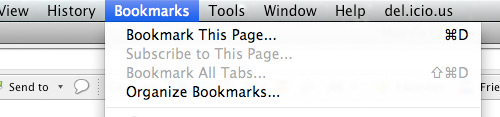
                    Look for Bookmarks on the top navigation. Select Organize Bookmarks…


Step 2

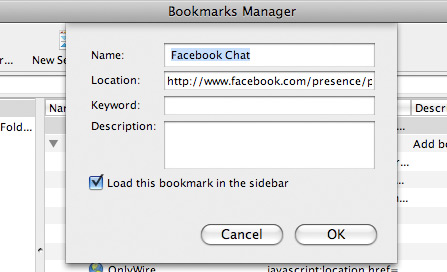
Click New Bookmark... tab and enter the following:

  • Name: Facebook Chat
  • Location: http://www.facebook.com/presence/popout.php
  • Check Load this bookmark in sidebar


Step 3

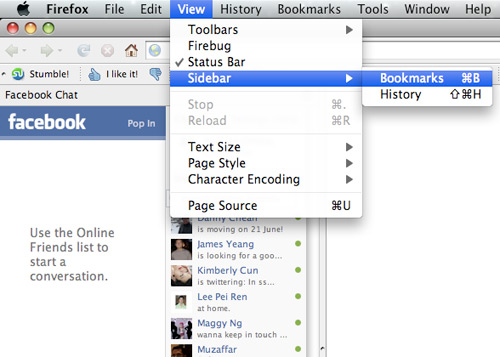
Launch the Firefox sidebar, click Facebook Chat and start chatting with your Facebook contacts within Firefox.


Design by Free WordPress Themes | Bloggerized by Lasantha - Premium Blogger Themes | Online Project management